How To Learn Kubernetes In 2026, Leveraging AI
By Sudheer Satyanarayana





TL;DR
- You need four things, nothing more: a laptop, AI, time, and commitment. No budget, no cohort.
- Build one small reference app first (Python + PostgreSQL). Prove it runs standalone, then in Docker. This is a requirement, not optional, and you deploy this same app at every level.
- Get the AI to draft a personal learning plan around that app, not a generic course. Tell it your background, your hours per week, and whether certification matters to you.
- Certification (CKA/CKAD) is optional. It may help with jobs or promotions, it costs money and time, and this series doesn’t require it either way.
- Learn through AI Q&A, not lectures: get quizzed, explain concepts back, get pushed on guesses.
- Round it out with YouTube for what needs to be seen, AI-generated diagrams mid-conversation, and the official Kubernetes docs, which are better as a learning tool than most people realize.
- Turn the AI’s draft plan into real commitments with a “done” bar per level.
- Prompt for learning, not answers: put the first attempt on yourself, use the AI to check it.
- Take notes in your own words, and draw diagrams, on paper or in a tool like Excalidraw.
- Type new YAML and commands yourself instead of copy-pasting; it’s where you catch mistakes.
| Level | Environment | Depends on |
|---|---|---|
| 1 | Minikube on a laptop | Nothing, this is the starting point |
| 2 | A hand built multi VM cluster | Level 1’s kubectl basics |
| 3 | A self managed cluster on AWS EC2 | Level 2’s cluster-bootstrap mechanics |
| 4 | EKS | Level 3’s AWS familiarity |
What This Actually Takes
You need four things to learn Kubernetes this way, and nothing beyond them: a laptop, access to AI, time, and commitment. No budget line, no employer-sponsored training slot, no waiting for a cohort to start.
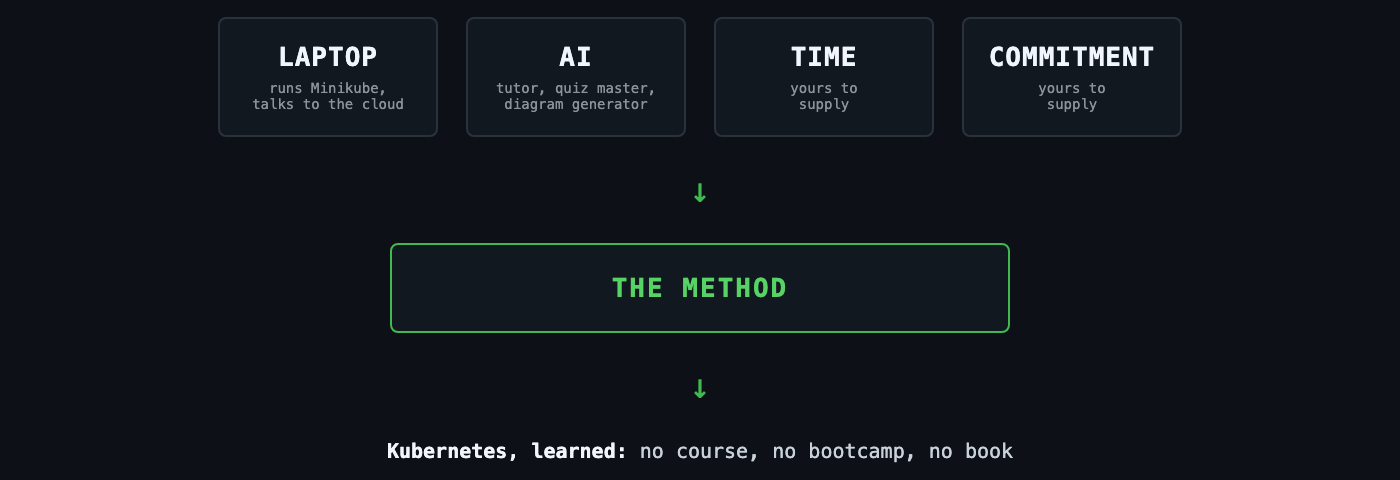
The laptop runs Minikube and, later, talks to a cloud VM. The AI is your tutor, your quiz master, and your diagram generator. The time and the commitment are yours to supply, and no post can substitute for either. What this post can do is show you how to point the first two at the job properly, so the time and commitment you put in actually compound instead of leaking away into the wrong kind of studying.
The Old Advice Is Out Of Date
For years, the standard advice for learning something like Kubernetes was simple: buy a course, get a thick book, work through it cover to cover, then go build something. That advice made sense when good explanations were scarce and you had to ration your access to them. It doesn’t make sense anymore. A capable AI model is sitting in a browser tab, willing to answer any question you ask it, as many times as you need, phrased exactly the way that helps you.
After twenty years running production infrastructure and mentoring engineers through Kubernetes, here is how I would learn it today, with no paid course, no bootcamp, and no cover to cover book. This post lays out the method. It’s the anchor for a series: each following post applies it to a specific level, Minikube on a laptop, a hand built multi VM cluster, a self managed cluster on AWS EC2, and finally EKS. Read this post first. The levels assume it.
Here’s the method.
1. Skip Cover-To-Cover Books And Paid Courses, At Least For Now
A Kubernetes book, read start to finish, teaches you things in the order the author decided to write them, not the order you need them. A paid course does the same thing, just with a syllabus instead of a table of contents. Half of it won’t be relevant to what you’re building this week, and by the time it becomes relevant, you’ll have forgotten it. Don’t make that trade as a beginner.
Learn need driven instead. Start with the smallest thing you can actually run, a single pod, and let each new question come from something you just hit, not from a table of contents or a curriculum. When you don’t understand why a Service routes traffic the way it does, that’s the moment to learn about Services, not three chapters earlier because a book put it there. Reference material still matters. Keep the official Kubernetes docs open. Use them to look things up, not to read linearly.
There is a time for reading a book cover to cover, and there is a place for a good paid course. That time is usually later, once you already have a working mental model and want the depth or structure a book or course can add on top of it, not at the very start. Treat them as a luxury you can add once the fundamentals are in place, not a prerequisite. The point of this method isn’t that books and courses are bad. It’s that you don’t need to spend money on either one to get started, or to get quite far.
2. Build One Reference App, And Use It Across Every Level
This is a requirement, not a nice-to-have. Before you write a single line of Kubernetes YAML, build one small application and reuse it at every level, instead of deploying a different toy app each time. Ask the AI to generate a simple Python web app with a PostgreSQL dependency, a couple of endpoints and one table is plenty. Put it in a git repository.
Then prove it works in two stages, in order, and don’t skip either one:
- Run it without containers. Install the dependencies locally, point it at a local or a quick throwaway PostgreSQL instance, and hit the endpoints yourself. If something’s broken here, it’s an application bug, plain and simple.
- Run it with Docker. Build the image with Docker, Podman, or a similar tool, run the container locally, and hit the same endpoints again. If it worked in stage one but breaks here, you’ve isolated the problem to the container build or its configuration, not the app logic and not Kubernetes.
Once both stages pass, push the image somewhere you can pull it from later. Prefer a free registry like Docker Hub or GitHub Container Registry over a paid one like ECR.
Reference app
     |
     v
Stage 1: runs standalone?  --no--> fix the app, stop here
     |
    yes
     v
Stage 2: runs in Docker?   --no--> fix the container build, stop here
     |
    yes
     v
Push image to a free registry
     |
     v
Ready for Level 1
Take a devops or infra engineer who’s strong on Linux, networking, and Docker but new to Kubernetes. If they skip straight from “the app runs on my laptop” to a Kubernetes Deployment, the first time something fails inside the cluster, they won’t know whether the bug is in the app, in the container build, or in Kubernetes itself, and they’ll end up debugging all three at once. Proving the app works locally, then in a plain container, before Kubernetes ever enters the picture, removes two of those three variables. Any failure from Level 1 onward is then, by construction, a Kubernetes problem.
Make this app the constant across the whole series. At every level, the goal is the same: deploy this app onto the cluster, and each level pushes you to do it in a more realistic way than the last. That’s where config management, secret management, scaling, a StatefulSet for the database, persistent volumes, and ingress all come from, not from four unrelated toy examples. Without a real app to deploy, “learning Kubernetes” stays abstract. Don’t move on to any of the steps below, and don’t start Level 1, until this app exists, runs standalone, runs in Docker, and its image is sitting in a registry you can pull from.
Generate a small Python web app, Flask or FastAPI, with a dependency on PostgreSQL for storage.
Keep it to two or three endpoints and one table. Make sure database connection details can be
overridden with environment variables, not hardcoded, and give me a Dockerfile to build it.
Here's my reference app: [paste the code or describe it]. I'm going to deploy it on Kubernetes
across four levels of increasing complexity. Give me a plan for what to learn and configure at
each level using this app: config management, secret management, scaling, a StatefulSet for the
database, persistent volumes, and ingress.
3. Prompt The AI For A Learning Plan
Once the reference app exists, get the AI to draft you a personal plan built around it. Don’t ask a generic “how do I learn Kubernetes.” Describe the app you already have ready and say plainly that the goal is to learn Kubernetes by deploying it, not by working through disconnected examples. Tell it about yourself too: what you already know (Linux, Docker, a programming language, any on-call or ops experience), how many hours a week you can realistically give this, and whether you’re aiming for a certification along the way (more on that next). If it’s useful, point it at this post so it understands the method you’re following, not a generic course structure.
Treat the first plan it hands back as a draft, not a contract. Push back on anything that looks padded or vague, and ask for a plan broken into levels with a clear finish line for each one. For Level 1 specifically, ask for a sequence, not just a topic list: install Minikube, verify the install with a couple of low-stakes pods that have nothing to do with your app (an Ubuntu pod you can shell into is a good one), and only then move on to deploying your actual app and its database.
A topic list like “learn Pods, Deployments, Services” isn’t a done bar, it’s a syllabus. Ask for something you can actually pass or fail. For Level 1, that means walking away with proof, not just exposure, on each of these:
- The app pod runs on Minikube.
- The database runs on Minikube too, and the app actually depends on it: it should fail, not silently degrade, if it can’t reach the database.
- Backup and restore works: back up the database data, tear Minikube down, bring it back up, and restore from that backup. If this only works while the cluster is still running, it isn’t proven yet.
- A Deployment and a ReplicaSet do their job: scale the app to multiple replicas, delete one by hand, and watch it get replaced automatically.
- A Service load-balances traffic across those replicas, and Ingress gets you to the app without going through a raw Service or a port-forward.
- Stretch goal: add a HorizontalPodAutoscaler and watch it react to load instead of a fixed replica count.
If you want the mechanics of any of these objects explained before you ask the AI to quiz you on them, Kubernetes Objects Required For A Typical Web Application: Part I covers Deployments, ReplicaSets, Services, and Ingress, and Part II covers the HorizontalPodAutoscaler and the PersistentVolume/PersistentVolumeClaim pair backup and restore depends on.
I'm a backend engineer with three years of Python experience. I'm comfortable with Linux and
Docker but I've never worked with Kubernetes. I can give this about five hours a week, split
across two sessions. I've already built a reference app, a Flask/FastAPI service backed by
PostgreSQL, packaged as a Docker image in a registry, and confirmed it runs both standalone and
in Docker. My goal is to learn Kubernetes by deploying this exact app, not by working through
generic examples. I want to follow a learning method built around AI Q&A sessions, hand written
notes and diagrams, and typing new YAML and commands myself instead of copying and pasting, not a
linear course. Draft me a learning plan across four levels that all deploy this same app:
Minikube on a laptop, a hand built multi VM cluster, a self managed cluster on AWS EC2, and EKS.
Give me a "done" bar for each level before I move to the next. For Level 1, break it into steps:
install Minikube, verify the install with a plain Ubuntu pod and maybe one other simple pod
before touching my app, then deploy my app and its PostgreSQL database. Make the Level 1 done bar
concrete proof, not just exposure: the app pod running, the database running with the app failing
if it can't reach the database, a tested backup and restore of the database data across a full
Minikube teardown and restart, a Deployment and ReplicaSet proven by killing a pod and watching it
get replaced, a Service load-balancing across replicas, and Ingress reaching the app. A
HorizontalPodAutoscaler if there's time.
I have no infrastructure background at all, but I'm comfortable writing small Python scripts.
I can give Kubernetes about three hours a week. I have the same reference app described above,
already running standalone and in Docker. Suggest what I should learn before I even start on
Kubernetes basics, then draft the same four level plan above, adjusted for my pace, still
starting Level 1 with Minikube install and verification pods before my app goes anywhere near
the cluster. For Level 1's done bar, don't just list topics: I want to prove the app pod runs,
the database runs and the app fails without it, a database backup survives tearing Minikube down
and restoring it, a Deployment and ReplicaSet survive me killing a pod by hand, a Service
load-balances across replicas, and Ingress reaches the app.
I'm an infra engineer with about eight years of experience: solid with Linux, networking,
Terraform, and Docker/Podman day to day, plus on-call experience running production systems, but
I've never run a real Kubernetes cluster, only poked at it in passing. I can give this about six
hours a week. I've already built a reference app, a Flask/FastAPI service backed by PostgreSQL,
confirmed it runs standalone and as a container. Don't spend much time on Linux or Docker
fundamentals, I know those. Focus the plan on Kubernetes concepts I wouldn't already know from
infra work: the control plane, scheduling, networking model, and storage, versus what's
similar to what I already do with Terraform and Ansible. Draft me a learning plan across four
levels that all deploy this same app: Minikube on a laptop, a hand built multi VM cluster, a
self managed cluster on AWS EC2, and EKS. Give me a "done" bar for each level. For Level 1, walk
me through installing Minikube, verifying it with an Ubuntu pod and one other simple pod so I can
confirm networking and exec access work the way I'd expect from my Docker background, and only
then deploying my app and its database. For the Level 1 done bar I want actual proof, not a
topic list: the app pod and database pod both running with the app failing without the database,
a database backup that survives a full Minikube teardown and restart, a Deployment/ReplicaSet
proven by killing a pod by hand, a Service load-balancing across replicas, Ingress reaching the
app, and a HorizontalPodAutoscaler if time allows.
Here’s roughly what comes back for that infra engineer prompt. Treat this as illustrative, not a script to copy: the exact content should shift based on your own background and pace, that’s the whole point of asking for it instead of following a fixed syllabus.
Level 1: Minikube on a laptop Skip Linux and Docker fundamentals, you already have those. Focus on what a Pod, Deployment, and Service actually do, and how the control plane and kubelet compare to tools you already run (kubelet as an always-on agent, closer to a config management agent than to Terraform, which only acts at apply time).
- Install Minikube and kubectl, start the cluster, confirm it with
kubectl get nodes.- Run a plain Ubuntu pod,
kubectl execinto it, confirm outbound network access.- Run a second simple pod (nginx is fine) behind a Service, curl it from the Ubuntu pod to see pod-to-pod networking work.
- Deploy Postgres as a StatefulSet with a PersistentVolumeClaim, then deploy your app as a Deployment, wired to Postgres with a ConfigMap and environment variables. Confirm the app fails to serve if you point it at a database address that doesn’t exist.
- Back up the Postgres data, delete the Minikube cluster entirely, bring up a fresh one, and restore from that backup. If you didn’t tear the cluster down, you haven’t proven it.
- Scale the app Deployment to 3 replicas, delete one pod by hand and watch the ReplicaSet replace it, then curl the Service repeatedly to see it load-balance across the survivors. Add an Ingress in front of the Service and reach the app through it, not a port-forward.
- Stretch: add a HorizontalPodAutoscaler to the app and generate enough load to watch it add a replica on its own. Done bar: explain what a Pod, Deployment, ReplicaSet, StatefulSet, Service, Ingress, kubelet, and the control plane each do, in your own words, tied to an infra equivalent you already know. Tear the whole thing down, including the database data, and rebuild it from scratch, backup included, without checking notes.
Level 2: hand built multi VM cluster This is where scheduling and etcd, the parts Terraform and Ansible don’t have an equivalent for, actually show up.
- Provision the VMs (you already know this part).
- Bootstrap the control plane with kubeadm, look at etcd directly.
- Join the workers, move your app and database over from Level 1.
- Add resource requests and limits, then a taint and a matching toleration, to see scheduling respond to both. Done bar: explain etcd’s role and what you’d expect to see if the control plane went down. Join and remove a worker node without looking anything up.
Level 3: self managed cluster on AWS EC2 Same bootstrap as Level 2, now with cloud networking and cost in the picture.
- Provision EC2 instances with Terraform, same pattern as Level 2 otherwise.
- Add a persistent EBS volume for Postgres instead of local storage.
- Set up basic ingress (an ingress controller or a load balancer Service) in front of the app.
- Move database credentials into a Secret instead of plain environment variables. Done bar: state what you’d tell a colleague about self managed versus managed trade-offs at this scale. App and database survive a worker node being replaced.
Level 4: EKS Contrast against Level 3 directly, then shift toward exam-style recall.
- Stand up an EKS cluster, migrate the app over.
- Move Postgres to a StatefulSet with a PersistentVolumeClaim.
- Add a HorizontalPodAutoscaler to the app.
- Do a round of CKA-style scenario questions on everything covered across all four levels. Done bar: articulate what changes and what stays the same between the EC2 cluster and EKS. Comfortable with CKA-style scenario questions on this material.
4. Decide If Certification Is Worth It To You
A CKA or CKAD certification is not required to learn Kubernetes well, and this series doesn’t assume you’re chasing one. Whether it’s worth the exam fee and the extra prep time depends on your situation.
| Question | Short answer |
|---|---|
| Required to learn Kubernetes well? | No |
| Might help you get hired or promoted? | Sometimes, depends on the employer and market |
| Costs money and prep time? | Yes, factor both in before deciding |
| Does this series require it? | No, but it’s compatible if you want it |
Some employers filter resumes on it, some hiring managers don’t care at all, and in some markets it matters more for a promotion case than for landing a first role. I don’t have a strong opinion either way. Weigh the cost of the exam and the time you’d spend on exam-specific drilling against what it would actually get you where you work or want to work.
If you do want it, decide that now rather than later. Mention it in the prompt from the last section, and let the AI weave exam-style questions into your practice as you go, especially once you reach Level 4.
5. Learn Through Q&A Sessions, Not Lectures
The single biggest shift is treating the AI as a tutor running a dialogue, not a search engine returning a page. A lecture format, even a well written one, is one directional. A Q&A session adapts to what you don’t understand yet.
Concretely, ask the AI to:
- Quiz you before it explains something, so you find out what you actually know first.
- Explain why, not just how. “Why does a Deployment create a ReplicaSet instead of managing pods directly?” builds a mental model. “How do I create a Deployment?” gives you a command you’ll forget next week.
- Poke holes in your explanation. Once you think you understand something, explain it back to the AI in your own words and ask it to correct anything wrong. This surfaces the gaps a self-assessment misses.
- Push back when you’re guessing. Tell it explicitly not to confirm a wrong answer just because you sounded confident.
This only works if you actually engage. Asking one question and reading one answer is still a lecture, just a shorter one. The learning happens in the back and forth.
6. Round Out AI Q&A With YouTube, Generated Images, And The Official Docs

AI Q&A is the primary channel, but it’s still mostly text, and it’s not the only free resource worth using. Bring in these three alongside it.
| Resource | Best for | Use it the same way |
|---|---|---|
| YouTube | Seeing things happen: a rolling update in progress, traffic flowing between pods behind a Service, a node draining and pods rescheduling | Search the specific concept you’re stuck on, not a full “Kubernetes course” playlist |
| AI-generated or AI-sourced images | An on-the-spot diagram of exactly what you’re mid-conversation about, redrawn with your own app and namespace names | Ask for it instead of settling for a text-only description |
| Official Kubernetes docs | Concept pages with diagrams, plus short hands-on tutorials to check your understanding against | Use them as a learning tool, not only an API reference |
A 20-minute video on how kube-proxy routes traffic, watched right after an AI Q&A session on the same topic, does more for a visual concept than another paragraph of text would. A multi-hour playlist you work through top to bottom puts you back in the cover-to-cover book problem from point 1, just with video instead of text. The same logic applies to the docs: a short tutorial read right after you hit the wall it explains sticks; the same tutorial read cover to cover in week one does not.
Whatever you pick up from any of these three, treat it the same as an AI conversation: write the key point in your own words, and if it’s the kind of thing that has moving parts, sketch it, don’t just bookmark it and move on.
7. Commit To The Plan, Level By Level
Open ended “learn Kubernetes” doesn’t survive contact with a busy week. Take the plan the AI drafted for you in section 3 and turn it into commitments, not just a document: a small number of levels, each with a clear “done” bar, and a real reason to finish each one before starting the next.
Only start a level once the previous level’s “done” bar is met. Write that bar down before you start the level, not after, so you can’t quietly redefine “done” downward when it gets tedious. If the AI’s draft plan didn’t already include one, ask it to help: describe the level, and have it propose what a competent grasp of it should include, then edit that proposal yourself.
Commit publicly if you can. Write as you go rather than after you’re already expert. It’s much harder to hand wave a gap when you know you have to show your notes.
8. Prompt For Learning, Not For Answers
Most people’s default prompt to an AI is answer seeking: “how do I fix this YAML error.” That’s fine for getting unblocked, but it’s a different mode from a learning prompt, which is built to leave you with understanding you keep after the session ends. A few shapes worth using:
Quiz me on the difference between a Deployment and a ReplicaSet before you explain it to me.
I think a Service routes traffic to pods using label selectors, not pod names.
Tell me what's wrong with that before you tell me what's right.
Give me a Kubernetes manifest with one deliberate bug in it and don't tell me what it is.
Explain etcd's role in the control plane the way you'd explain a split-brain incident
to someone debugging it at 2am, not the way a glossary would define it.
Notice the pattern. Each one puts the burden of a first attempt on you and uses the AI to check or challenge that attempt, instead of handing you a finished answer to read passively. Each level post in this series includes the actual prompt library used for that level, not just this general advice.
9. Take Notes, And Draw What You Learn

Keep a running set of notes for each level, and follow one rule: nothing gets pasted in verbatim from an AI response. If a concept is worth keeping, write it down the way you’d explain it to a colleague, from memory, after the conversation, not mid conversation while the explanation is still on screen. If you can’t restate it without looking back, you don’t understand it yet, and it goes back into the Q&A queue.
Diagrams belong in this habit too. Kubernetes is a system of moving, interconnected parts, control plane, etcd, kubelet, kube-proxy, Services, Ingress, and text notes alone will only get you so far toward seeing how they fit together. Sketch it. A notebook and pen work fine for a quick control plane diagram; a tool like Excalidraw or draw.io works well when you want to version or revisit it. Draw the request path for a Service call. Draw what happens when a pod crashes and gets rescheduled. The act of drawing forces you to commit to a structure, and a wrong structure on paper is a fast, cheap way to find a gap in your understanding before it costs you time on a real cluster.
This is slower than keeping a folder of saved chat transcripts. It’s also the part that actually produces retention. A transcript is something you have. Notes and diagrams in your own words are something you know.
10. Type It Yourself

When you run into a new type of YAML or a command you haven’t used before, type it out instead of
copying and pasting it straight into your terminal. This sounds like a small, almost superstitious
habit, but the mechanism is real. Typing forces you to look at every line, which is where you
notice the field you don’t recognize, the indentation that matters, the flag you’d skip over
while your eyes glaze past a pasted block. Some of the most useful corrections come while typing,
catching a wrong API version, noticing a selector that doesn’t actually match your pod labels,
before you ever run the command, because typing forces you to read what you’re about to do.
It also builds the muscle memory that matters when you’re troubleshooting a real cluster with no AI assistant open, which is still the situation you’ll be in more often than not.
The Research Behind This
Most of this method rests on cognitive science that predates AI by decades, applied here to a new tool. One study is directly about AI tutoring; the rest are general findings about how people learn that this method leans on.
| This method says | The research | Finding |
|---|---|---|
| Learn through AI Q&A, not lectures | Kestin et al., 2025, Scientific Reports | In a randomized trial, students using an AI tutor learned more than twice as much, in less time, than students in an active-learning classroom |
| Active learning beats passive lectures generally | Freeman et al., 2014, PNAS | Meta-analysis of 225 studies: active learning raised STEM exam scores by about 6%, and lecture-only students were 1.5x more likely to fail |
| Get quizzed instead of just reading answers | Roediger & Karpicke, 2006, Psychological Science | Testing beat re-studying 61% to 40% on a one-week retention test |
| Explain concepts back in your own words | Chi et al., 1994, Cognitive Science | Self-explanation improved recall and transfer more than repetition or being asked “why” |
| Type new YAML and commands instead of copy-pasting | Slamecka & Graf, 1978, on the generation effect | Self-produced information is reliably remembered better than the same information copied passively |
| Draw diagrams, not just notes | Wammes, Meade & Fernandes, 2016, Quarterly Journal of Experimental Psychology | Drawing roughly doubled free recall compared to writing the same material |
| Spread levels out instead of cramming | Cepeda et al., 2006, Psychological Bulletin | Distributed practice across sessions reliably beats massed, back-to-back practice for long-term retention |
One honest caveat: the popular claim that handwritten notes beat typed notes (Mueller & Oppenheimer, 2014) made headlines but didn’t hold up cleanly under replication (Morehead, Dunlosky & Rawson, 2019 found the effect was inconsistent and mostly not significant). That’s why the notes and diagrams advice in this post is grounded in the generation and self-explanation research above, not in that specific, shakier claim. Method over medium: what matters is producing the explanation yourself, not which tool your hand is holding while you do it.
What’s Next
That’s the method. Before Level 1, build the reference app from section 2 and get its image into a registry. Then Levels 1 through 4 apply everything above to Kubernetes specifically, each one building on the environment and understanding from the one before:
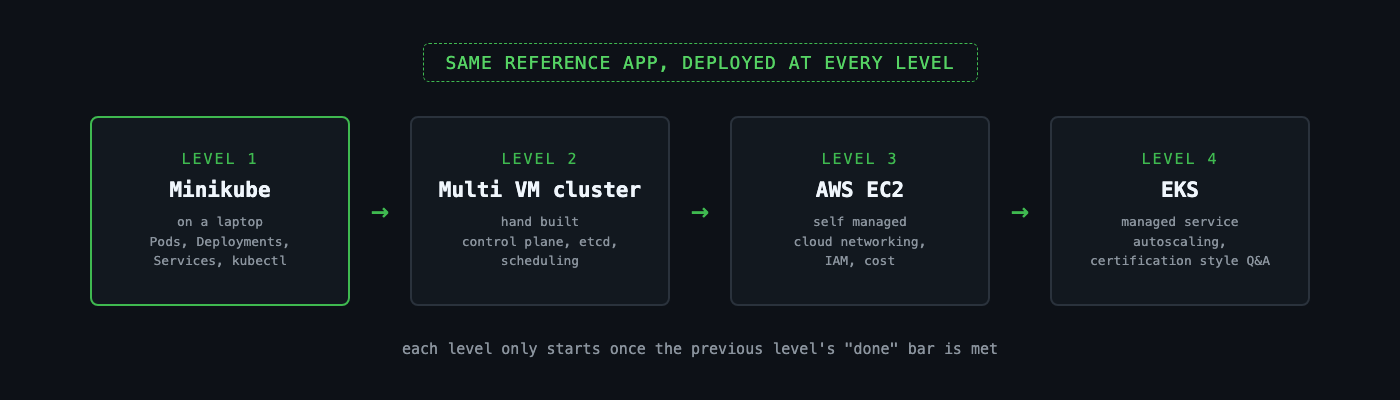
| Level | Environment | What’s new | Builds on |
|---|---|---|---|
| 1 | Minikube on a laptop | Pods, Deployments, Services, kubectl | The reference app itself |
| 2 | A hand built multi VM cluster | Control plane, etcd, scheduling | Level 1’s kubectl fluency |
| 3 | A self managed cluster on AWS EC2 | Cloud networking, IAM, cost | Level 2’s bootstrap mechanics |
| 4 | EKS | Managed service contrast, autoscaling, certification style questions | Level 3’s AWS familiarity |
Start with Level 1 once it’s published, and bring the habits above, and your reference app, with you. The levels won’t re-explain them.

Go break something. That’s still the fastest way to learn this.