SOPS To Manage Secrets In Git Repositories
By Sudheer Satyanarayana
In a previous post, we discussed using age to manage secrets in Git repositories.
In this post, let’s improve our secrets management workflow in Git repositories using SOPS.
sops is an editor of encrypted files that supports popular configuration formats such as YAML and various encryption
techniques such as age.
Read the blog post about age to install the package and creating the key file.
This time, we will use sops to perform encryption and decryption operations instead of the age command.
Before that, we set the environment variable SOPS_AGE_KEY_FILE to point the age key file.
export SOPS_AGE_KEY_FILE=<path to your age key file>
Now we are ready to use sops.
The unencrypted file: cat my-config.ini
db_pass=mysecretpassword
Remember to add the unencrypted INI file: my-config.ini to your .gitignore.
Command to encrypt the my-config.ini file with sops:
sops --encrypt --age age102k2xk5w6wptwravlu7u88lj7kr9jgcvvd2jq6j6956q3ueeag6s8dwqtv my-config.ini > my-config-encrypted.ini
Inspect the contents of my-config-encrypted.ini file:
db_pass = ENC[AES256_GCM,data:Gr+SiKBeYJgpkibsV6Z1Pg==,iv:gpC2wQJENGlHbYE3Dji5kQx+m8CestIz++AKUMrQpCw=,tag:bi/diUxLxbjdUuw5DQ9pyw==,type:str]

[sops]
age__list_0__map_recipient = age102k2xk5w6wptwravlu7u88lj7kr9jgcvvd2jq6j6956q3ueeag6s8dwqtv
age__list_0__map_enc       = -----BEGIN AGE ENCRYPTED FILE-----\nYWdlLWVuY3J5cHRpb24ub3JnL3YxCi0+IFgyNTUxOSB4TjY5ZTBHb1pKTmN0VHdW\nRDd3QXVPcCsrNm9sTUNvWWlkb01UR1RFNnlRCkFnMS9jRjEwVndzbHI4VFFMZzRu\nTU9XWm9WYkhuT2xQVkhrOVAwWGp5QmsKLS0tIEpKS25UemZUVDZyMzhKRHdFdHIv\nWmEzZHBFNUVMTHVsL0ZSb1NybHlhVlEKqQRMuWvTzp4kV+lEEFfumZuu7QsddXLh\nU+ricQ8eI23dMnJcES57nrVbJkhEsNU+fX43SLlBToHs6nz4nvR3Mw==\n-----END AGE ENCRYPTED FILE-----\n
unencrypted_suffix         = _unencrypted
mac                        = ENC[AES256_GCM,data:C3Qde+cY6RnNC/oVjWlB2g2C7yN5bi/p/aiB0VhSkkn4PiZMylQb/xOraSVn5F9gvXmBAMl/s6dbLG/nXDQ+0V4jl3pXKZkPX4gapLUEMy99k10eUsuo/TT/sEO0LBrwb1+JATR2lYV9zbi9il3hmT7q6FMxcwY/sh5uumrQOdc=,iv:JAnLtY3I/zNq+I78BQJ/OWmeSfMuXza5OdN8yt5A9Zo=,tag:TGUsqAWH2sXtPUng4PEbpA==,type:str]
version                    = 3.7.3
lastmodified               = 2023-01-11T17:09:23Z
The encrypted file contains the encrypted data and some sops metadata.
sops command to decrypt the encrypted file:
sops -d my-config-encrypted.ini
If you want, you can redirect the output to a file:
sops -d my-config-encrypted.ini > my-config.ini
Editing Encrypted Files With SOPS
This is the best part. You can edit encrypted files in your text editor without having to manually decrypt first.
sops my-config-encrypted.ini
sops decrypts the file and fills your editor buffer with the decrypted data. Once you save and quit the file,
the buffer is encrypted and saved to the file. This eliminates the need for temporary files to store decrypted files.
Initializing Git Repositories With .sops Configuration File
In the Git repository root, add the file .sops with PGP keys or AWS KMS Key ARN and a path regex. Having
the .sops configuration file at the repository root eliminates the need to specify encryption argument such
as --kms when creating new files.
Further Exploration Of SOPS
Look beyond PGP and try to use modern tools and technologies such as age along with sops to secure your secrets
in the Git repositories. The technology is not limited to just Git. You can use sops and age to share secrets
between your colleagues. sops also supports combining several encryption techniques such as AWS KMS and PGP
simultaneously.
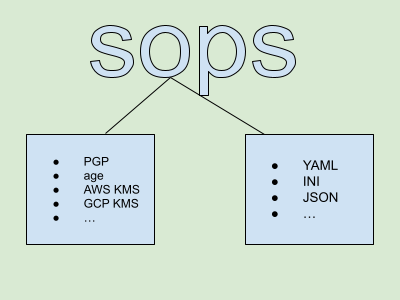
sops supports many file formats such as:
- YAML
- INI
- JSON
sops supports many encryption protocols and tools such as:
- PGP
age- AWS KMS
- GCP KMS
- Azure Key Vault